

Public sector · App for citizens and municipalities
Citizen reports, from the pavement to the technical office
ComuneVicino is Gruppo YEC’s app connecting citizens and municipalities. Anyone who spots a pothole, a broken street light or dumped waste reports it with photos and location; the municipality receives it in its back office, handles it, and the citizen follows every step from their phone.
- Product
- Gruppo YEC
- Sector
- Local public administration
- Platforms
- iOS and Android app, web back office
- Users
- Citizens, municipalities, administrators
At a glance
- states for every report: open, in progress, closed
- 3
- states for every report: open, in progress, closed
- profiles: citizen, municipality, administrator
- 3
- profiles: citizen, municipality, administrator
- notes at each step: one internal, one for the citizen
- 2
- notes at each step: one internal, one for the citizen
- digit access code by email, no password
- 6
- digit access code by email, no password
The challenge
Reports scattered across phone calls, emails and the front desk
For a citizen, reporting a problem often means finding the right office, explaining where it is over the phone and then hearing nothing more. For the municipality it means collecting requests from different channels, with no photos or exact coordinates, and no simple way to tell the person who reported it that the issue has been taken on or fixed.
The solution
An app for citizens, a back office for each municipality
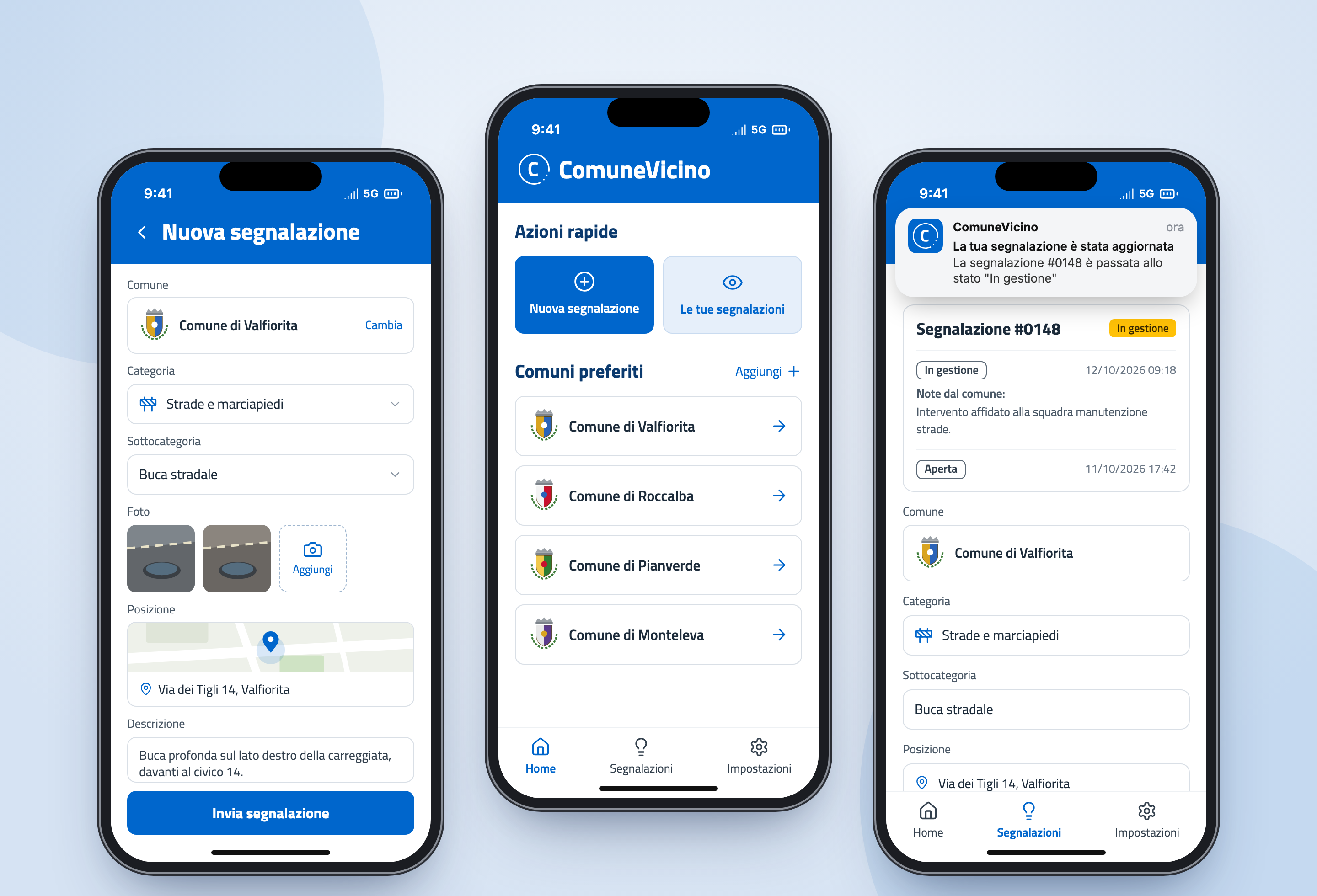
In the app the citizen picks the municipality and category, takes the photos and confirms the location on the map. The report reaches the municipality, which sees it in a list, on the dashboard and on the map, takes it on and closes it. At every status change the citizen gets a notification that opens their report directly.
How it works
From the photo to the closed report
01Sign-in
Registration with name, surname, phone and consents; access with a 6-digit code received by email.
02Report
Municipality, category and subcategory, at least one photo, location on the map and description.
03Notice to the municipality
The report enters the back office as open and the municipality receives an email with the details.
04Taking it on
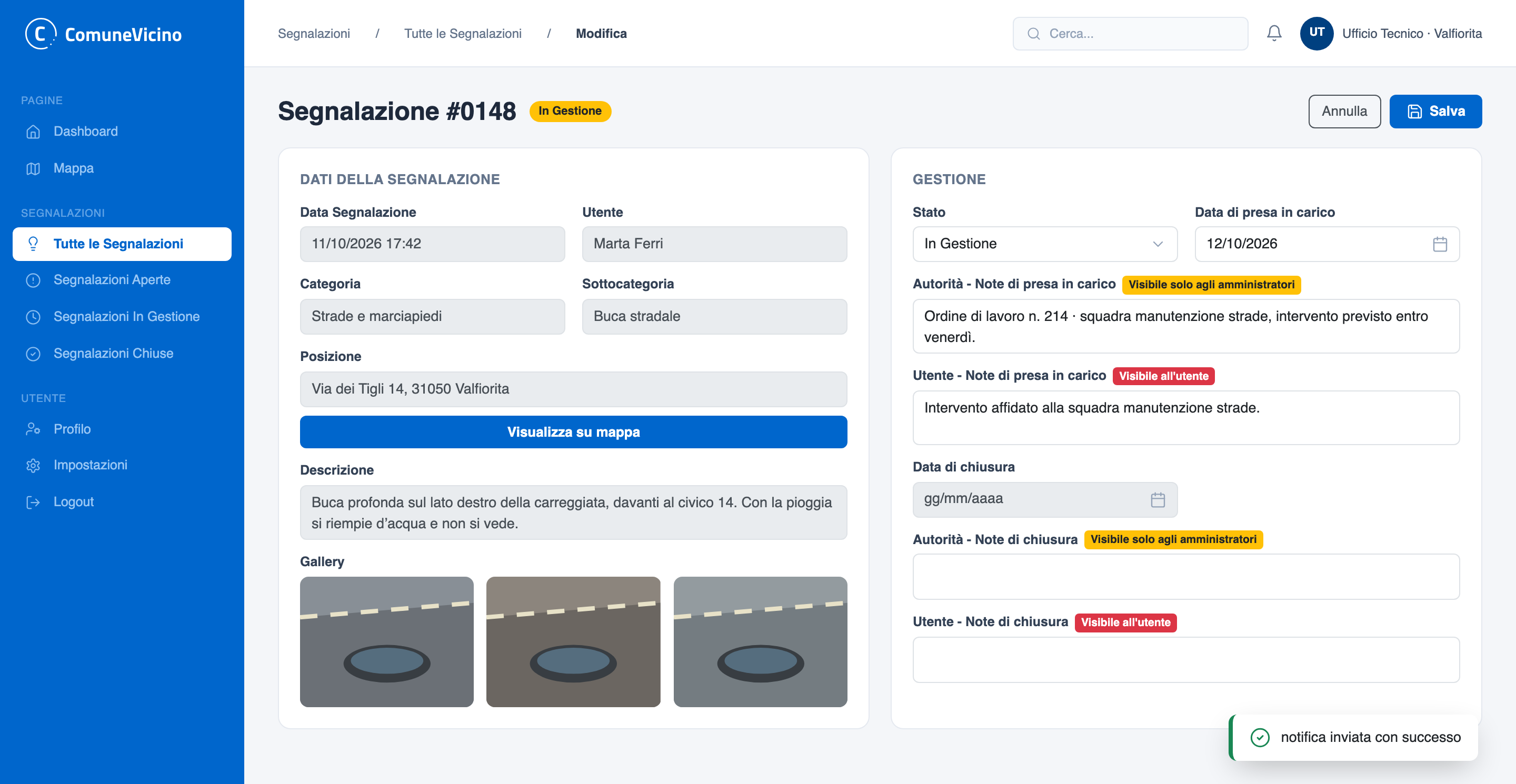
The municipality sets it in progress: date filled in automatically, an internal note and a note for the citizen.
05Notification
Before saving, the back office asks for confirmation; the citizen gets a push notification that opens the report.
06Closure
Closing records date and notes; in the app the citizen sees the full history of steps.
Two sides, one service
The citizen reports, the municipality responds
The same report lives in two places: in the app of the person who sent it and in the back office of the municipality that has to fix it. Each side sees what it needs.
iOS and Android app
The citizen
- Picks the municipality from favourites
- Sets category and subcategory
- Attaches photos and confirms the location
- Gets a notification at every status change
- Reads the municipality’s notes in the detail view
Web back office
The municipality
- Receives an email for every new report
- Sees list, dashboard and map
- Changes status with the date filled in automatically
- Writes an internal note and one for the citizen
- Cannot edit the data sent by the citizen
The life of a report
Three states, and the citizen always knows where things stand
Every status change is visible to the citizen: the back office warns before saving, and the notification is sent only when the status actually changes.
Report states
01Open
Sent from the app with photos and location. The municipality receives an email.
02In progress
Date taken on, internal note and note for the citizen. The notification is sent.
03Closed
Closing date and notes. The citizen gets the final notification.
Map
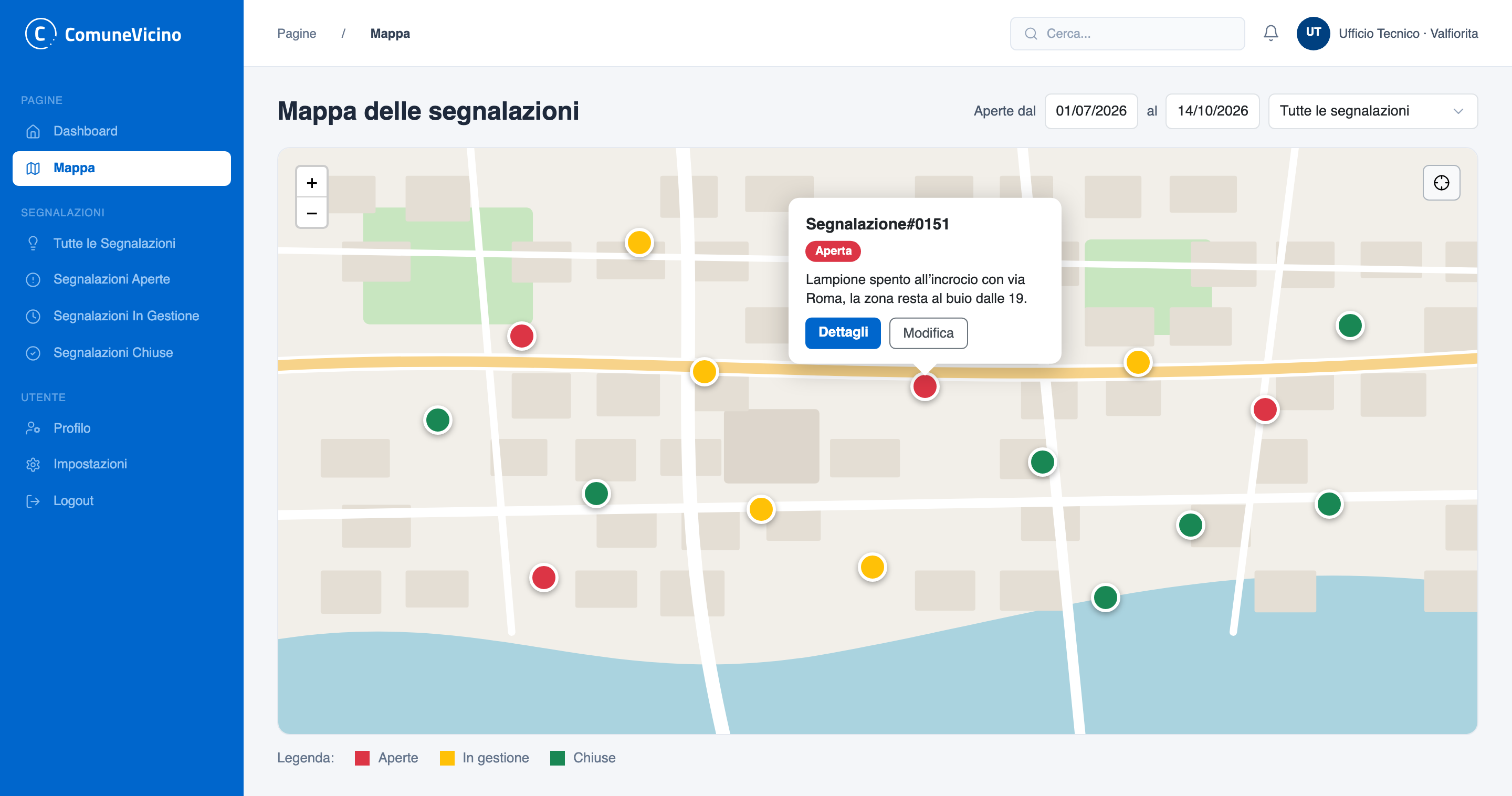
Every report in the area at a glance
The municipality filters by period and status and sees the reports on the map, with one colour per status. Clicking a marker opens a card with the description, details and edit.
Features
What ComuneVicino does
- Reports with photos and location
- One or more photos, resized automatically, and the exact point on the map.
- Categories and subcategories
- A list with icons managed centrally, the same for every municipality.
- Favourite municipalities
- Citizens save the municipalities they use and find them right on the home screen.
- Your reports
- A list per municipality with status and date; detail with the municipality’s notes at each step.
- Push notifications
- A notice at every status change, linking straight to the report in the app.
- Passwordless sign-in
- A 6-digit code sent by email at every sign-in.
- Municipality dashboard
- Reports by month or week, breakdown by status and category, total reporters, filters by period and status.
- Report map
- Markers coloured by status, quick card with details and edit.
- One back office per municipality
- Each municipality sees only its own reports; citizen data is read-only; municipalities, accounts and categories are managed by the administrators.
Want an app that connects your users with the people who have to respond?
Next case
Road haulage · TMS
Truck It Easy