

Design furniture · ERP with B2B e-commerce
Three furniture brands, one system from quote to invoice
HORM Italia designs and sells furniture under the Casamania, HORM and Orizzonti Italia brands. The new ERP replaces the previous system and brings sales, materials planning, purchasing, warehouse, shipping and documents together; the item master also feeds the catalogue for B2B e-commerce.
- Client
- HORM Italia Srl, Brugnera (Italy)
- Sector
- Design furniture
- Year
- Since 2023
- Users
- Sales, purchasing, warehouse, administration
At a glance
- brands managed in the same ERP
- 3
- brands managed in the same ERP
- languages for item names and e-commerce descriptions
- 5
- languages for item names and e-commerce descriptions
- discount levels on every customer order
- 5
- discount levels on every customer order
- supplier order types: subcontracting, raw material, production
- 3
- supplier order types: subcontracting, raw material, production
The challenge
A design catalogue, many subcontractors and customers worldwide
A design table or chair is made of semi-finished parts, raw materials and processing entrusted to subcontractors. Orders come from Italian and foreign retailers, each with their own price lists, discounts, incoterms and customs documents. The previous system did not hold sales, requirements, stock and shipping together, and the online catalogue was maintained separately.
The solution
An ERP built around how the company works
Every open order line goes through MRP, which explodes the bill of materials and suggests what to order and from whom. Goods enter the warehouse by location and leave with load plans, delivery notes and invoices that update order status on their own. The same item records feed the B2B catalogue.
How it works
From quote to invoice
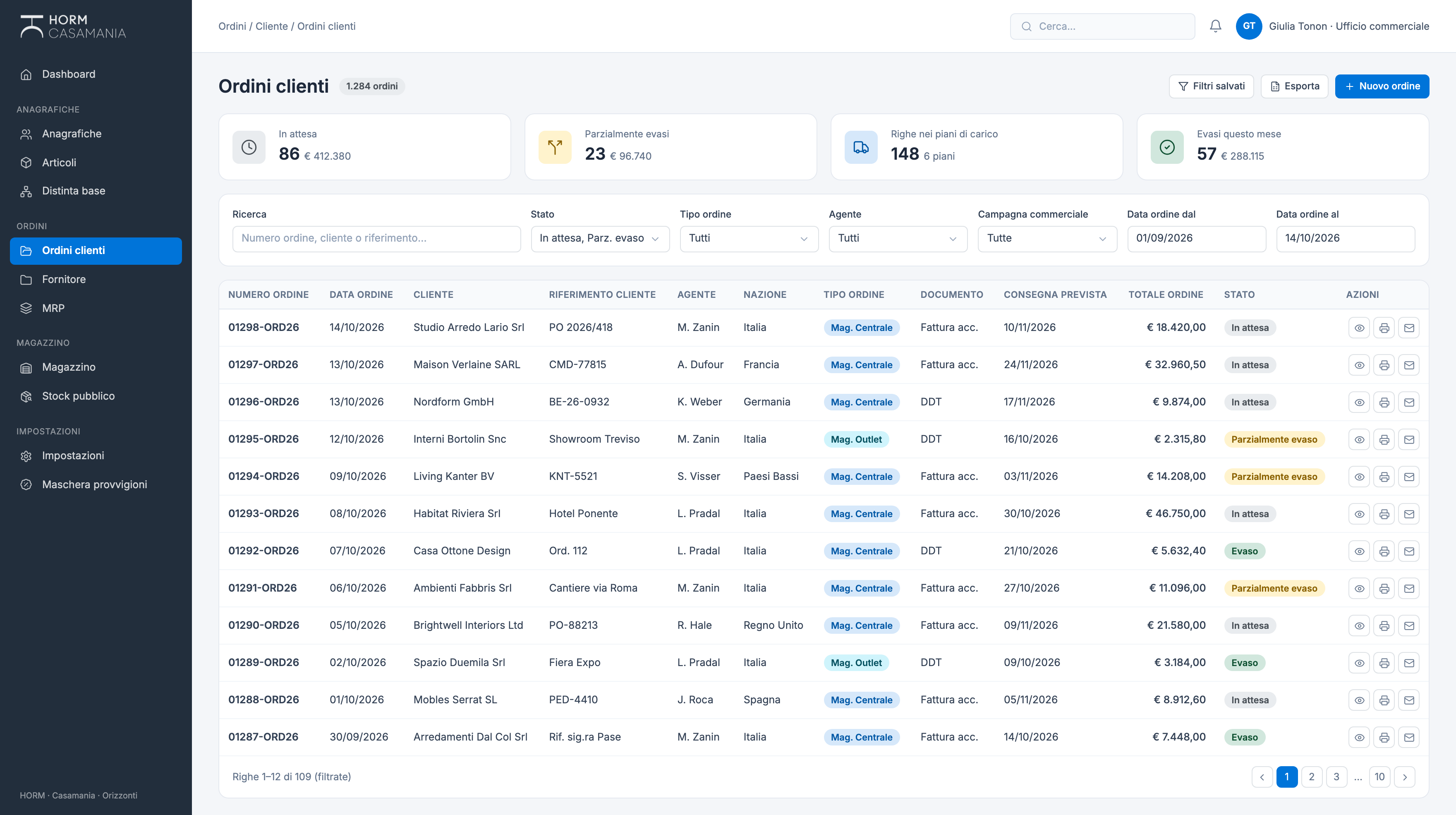
01Quote and order
The quote becomes an order with price list, five discounts, agent, specifier and central or outlet warehouse.
02MRP planning
Open lines are exploded through the bill of materials and compared with stock, ordered quantities and minimum stock.
03Supplier orders
Items are picked from the requirements list and orders are generated, grouped by supplier.
04Goods receipt
Supplier delivery notes load the goods into their location: aisle, bay, shelf.
05Load plan
Ready lines go into load plans, with loading list, packing list and plan report.
06Documents and stock out
Delivery note or invoice generated from the plan: stock is unloaded and the order turns partially or fully fulfilled on its own.
The order cycle
Every document knows where it stands, and updates the ones before it
When a delivery note or an invoice unloads the goods, the system updates the fulfilled quantity on each line and the customer order status. Items sold as kits also unload their components.
Customer order
- Pending
- Partially fulfilled
- Fulfilled
Supplier order
- Draft
- In preparation
- To send
- To fulfil
- Closed
Load plan
- Draft
- Confirmed
- Documents generated
Invoice
- Pending
- Invoiced
- Unloaded
ERP and B2B
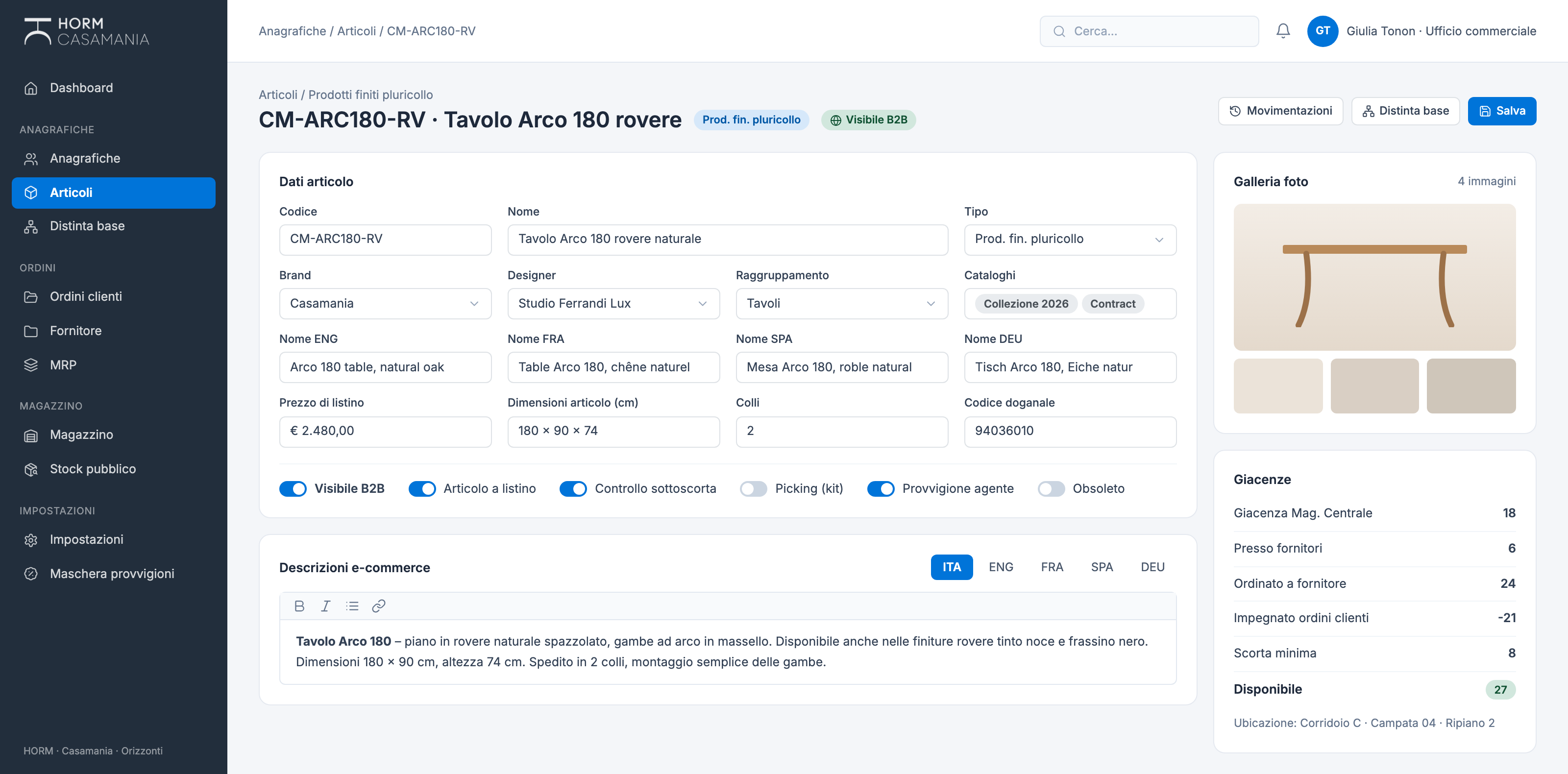
The B2B catalogue starts from the item record
The information B2B e-commerce needs lives in the same place as production and warehouse data: you decide which items are visible, write the descriptions in five languages and upload the photo gallery. One piece of data, updated once.
From the item recordB2B
- Visible on B2B, item on price list
- E-commerce descriptions in Italian, English, French, Spanish and German
- Product photo gallery
- Brand, catalogues and categories
- Finished product availability
Planning
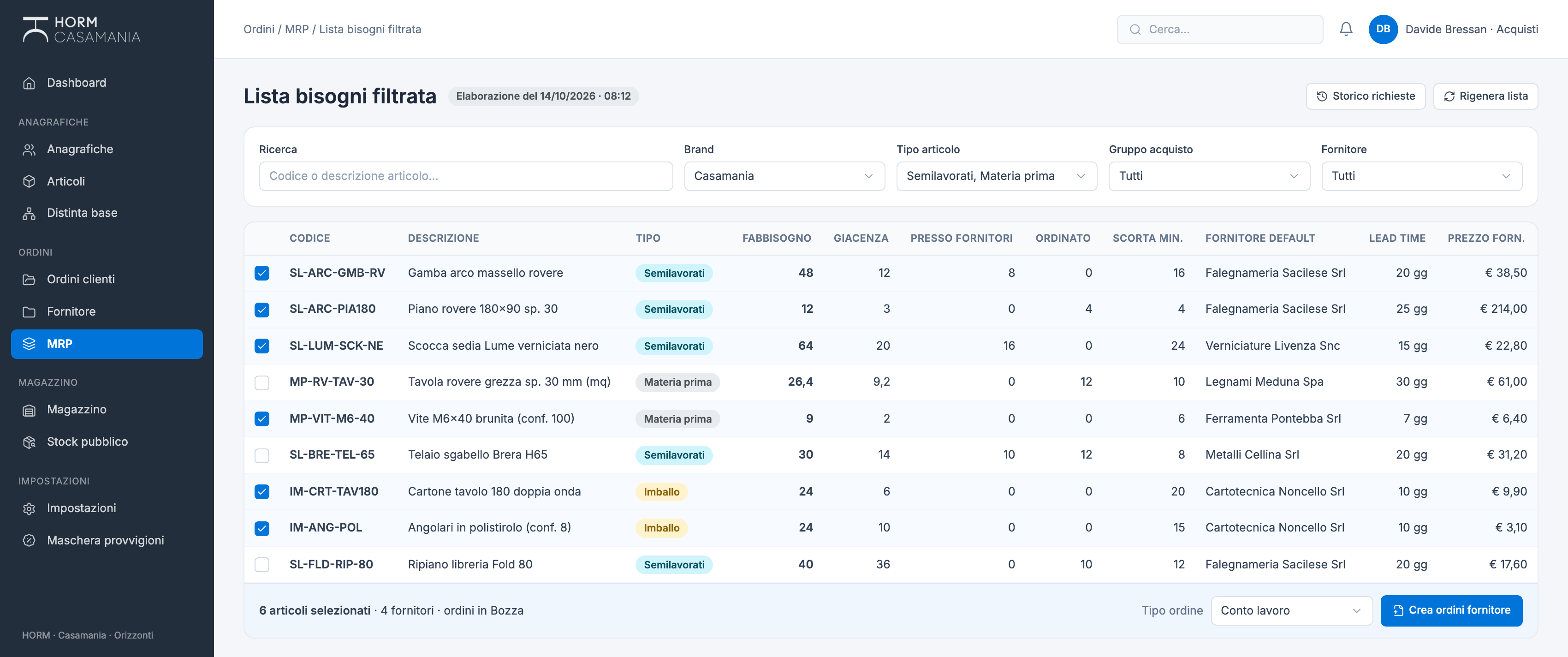
From requirements to supplier orders in one step
MRP starts from open order lines, walks down the bill of materials and suggests, for each semi-finished part, raw material or packaging item, the quantity to order, with default supplier, price and lead time. Select the lines and the supplier orders are created as drafts.
Features
What the ERP does
- Multilingual items
- Names in five languages, brand, designer, catalogues, categories, sizes, parcels and customs codes.
- Multi-level bill of materials
- Semi-finished parts and raw materials of every product, with Excel import and export.
- MRP and requirements list
- Full or filtered requirements, run history and log analysis.
- Supplier orders
- Subcontracting, raw material or in-house production, with supplier price lists imported from Excel.
- Location-based warehouse
- Stock in and out with reason codes, stock in-house and at suppliers, minimum stock calculated from consumption.
- Load plans
- Shipments by date and carrier, loading list, packing list and plan report.
- Documents and sending
- Quotes, orders, delivery notes and invoices from Word templates, as PDFs and sent by email.
- Commissions
- Calculated on sales for agents, designers and specifiers.
- B2B catalogue
- B2B visibility, e-commerce descriptions in five languages, photo gallery and available stock.
Has your management system stopped matching the way your company works?
Next case
Associations · Professional training
Fedespedi e-Library